A pane is a folder
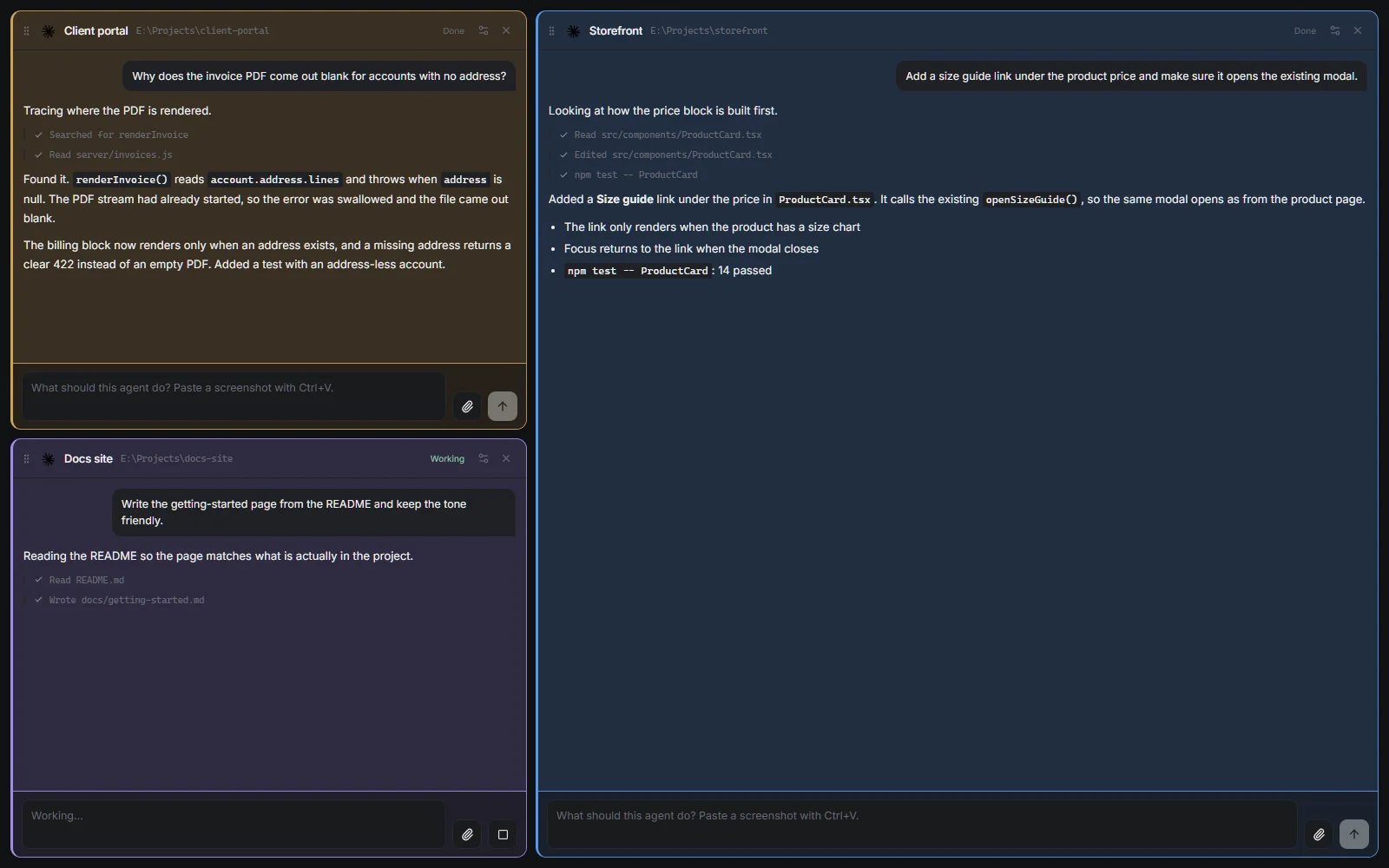
Point a pane at any folder and give it a task. No projects, workspaces or teams to create first. Add another pane by hovering the right edge.
IDE4 Lite is the small, fast way to run Codex and Claude Code side by side. Each pane works in a folder you choose, like a terminal opened there. Nothing to set up, the same free IDE4 account, and a download of about 100 MB.
Made for Windows · Installer coming soon
WHAT IT IS
The part of IDE4 you reach for most,
with everything else out of the way.
Point a pane at any folder and give it a task. No projects, workspaces or teams to create first. Add another pane by hovering the right edge.
Drag a pane's grip to dock it beside, above or below another. Drag the gutters to resize in both directions. Two small on the left, one big on the right, if that's how you work.
Dark, light, and two see-through looks that leave only your panes over the desktop. Each pane has its own colour and how strongly it shows. Click the pane's logo to switch.
02 / A CLOSER LOOK
Screenshots from IDE4 Lite 0.4.25.
Pick a view to see it in the app.
01 / PANES & LAYOUT
Every pane works in its own folder with its own agent. Lay them out however the work needs.
Drag a pane's grip to dock it beside, above or below another pane. Drag the gutters to resize in both directions.
02 / LOOKS
Four looks on one click: dark, light, and both again with the window's ground gone so only your panes show over the desktop.
The same panes and colours in light mode. Click any pane's logo to move to the next look, or pick one in pane settings.

LITE OR IDE4?
Lite is IDE4's agent panes on their own. IDE4 adds voice, projects, teams and more. Both are free, and both use the coding subscriptions you already have.
| IDE4 Lite | IDE4 | |
|---|---|---|
| Download size | About 100 MB | About 1.5 GB, with offline voice models included |
| Codex and Claude Code side by side | Yes | Yes |
| Bring your own API key | Yes | Yes |
| How work is organised | One folder per pane, nothing to set up | Projects, workspaces and teams |
| Pane colours, looks and layouts | Yes, plus two see-through looks | Yes, plus pop-out windows |
| Attachments and pasted screenshots | Yes | Yes |
| Voice dictation and local transcription | Not in Lite | Yes, offline |
| Teams, workflows, repositories, file editor | Not in Lite | Yes |
| Account | Your free IDE4 account | Your free IDE4 account |
| Updates | Downloaded in the background, installed when you restart | Downloaded in the background, installed when you restart |
04 / FAQ
Setup, updates, and what stays in the full app.
No. Lite is its own Windows app with its own installer. It signs in with the same free IDE4 account, so if you already have one there is nothing new to create.
Yes. IDE4 and IDE4 Lite install side by side, each with its own data. Open whichever fits the moment: Lite for a quick pane in a folder, IDE4 for projects, teams and voice.
Lite checks its own GitHub releases, downloads a new version in the background, and asks you when to restart. Nothing is installed until you choose to.
Voice dictation and local transcription, projects and workspaces, teams, workflows, connected repositories and the file editor. Those are in IDE4, which is why its installer is much larger.
On your computer. Lite works in the folders you choose and keeps its conversations locally. Your chosen AI provider processes the prompts you send under your own Codex or Claude Code account.

FREE DOWNLOAD
Free to download. Bring your own Codex or Claude Code account.
Download LiteMade for Windows · Installer coming soon
RELEASE DETAILS
Current stable release for Windows x64.
Compare this checksum with your downloaded file to confirm it matches the published installer.
The first Lite release is on its way. Until then, watch GitHub Releases .